23/09/2026 10:34am

Does Dark Mode Really Save Battery?
#Dark Mode
#save battery life
#OLED screen
#LCD display
#dark theme
#smartphone battery
Nowadays, almost every device whether it's a smartphone, computer, or tablet comes with Dark Mode as an option. Some people enable it because they find it easier on the eyes, while others simply prefer its sleek and modern appearance over the standard light theme. However, there's another reason that is often mentioned Dark Mode can help save battery life. This belief has led many users to keep Dark Mode enabled all the time, hoping their devices will last longer on a single charge. But how true is that? The answer isn't simply "yes" or "no." In reality, the result depends on several factors, most importantly the type of display your device uses and the screen brightness level under different usage conditions.
Research from Purdue University found that Dark Mode can indeed reduce power consumption on devices equipped with OLED displays. However, during typical indoor use where most users keep their screen brightness between 30% and 50% the overall power savings are relatively modest, at around 3–9%. When used outdoors at maximum screen brightness, however, the power savings can increase significantly to approximately 39–47%.
So why is there such a big difference? And why do some people barely notice any improvement in battery life after enabling Dark Mode? Before answering those questions, let's first understand what Dark Mode actually is and how it differs from the standard light mode.

What Is Dark Mode and How Does It Work?
Dark Mode, also known as dark theme, is a display mode that changes the user interface from a light-colored background to a dark one. At the same time, it adjusts the colors of text, icons, and other interface elements to ensure they remain easy to read against a black or dark gray background. Today, Dark Mode is supported across major operating systems including Android, iOS, Windows, and macOS as well as popular apps such as YouTube, Facebook, Instagram, and LINE.
Many people assume that Dark Mode was created primarily to save battery life. In reality, its main purpose is to provide users with an additional display option, allowing them to choose a theme that best suits their environment and personal preference. In low-light conditions, for example, a darker interface may feel more comfortable for some users.What made Dark Mode a widely discussed feature, however, is its potential impact on power consumption. Numerous reports suggest that using a dark theme can extend battery life, but the truth is that the answer doesn't depend on enabling Dark Mode alone.
The most important factor is the display technology used by your device. Different display types work in different ways, which means they consume different amounts of power when displaying black and white content. That's why some smartphones show a noticeable improvement in battery life with Dark Mode enabled, while others show little to no difference. So, which types of displays actually benefit from Dark Mode?
Does Dark Mode Really Save Battery Life?
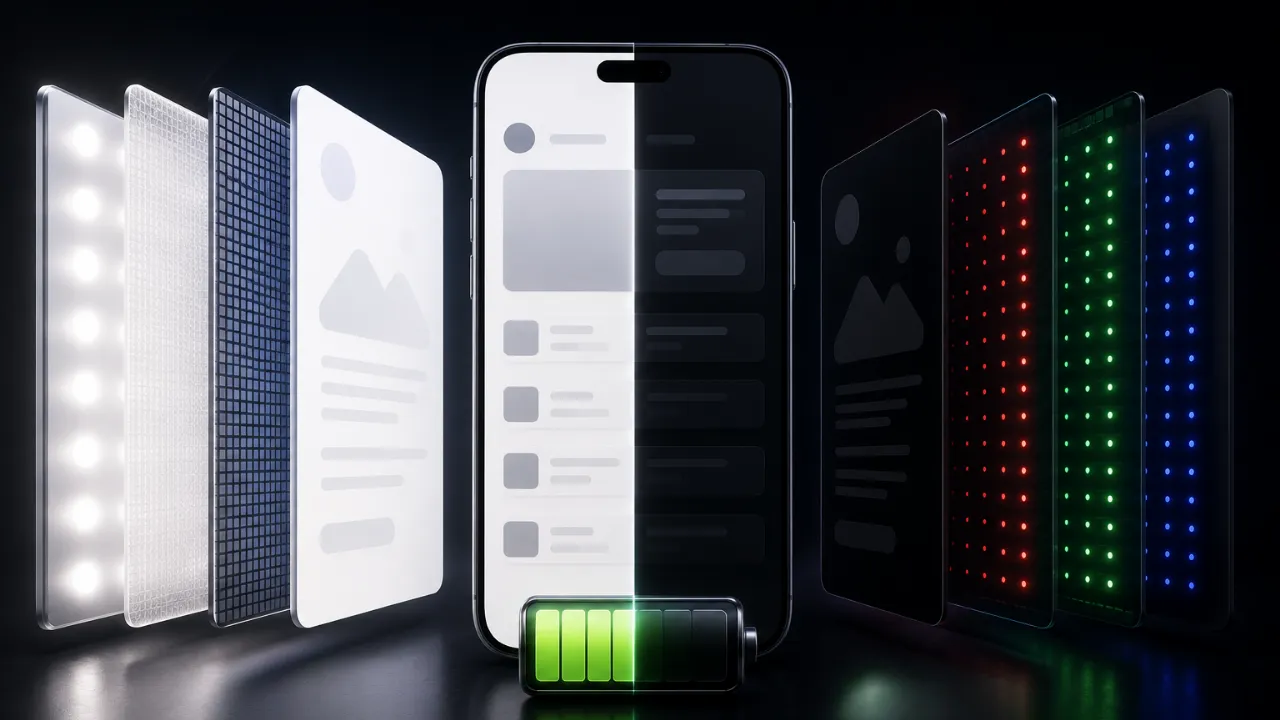
The short answer is yes but not on every device. Many people believe that simply turning on Dark Mode will instantly make their battery last longer. In reality, the outcome depends largely on the type of display your device uses. If your device features an OLED or AMOLED display, enabling Dark Mode can genuinely reduce power consumption. That's because these display technologies control each pixel independently. When displaying black, many of the pixels consume less power, and when displaying pure black, the pixels can turn off completely, using significantly less power than they would when displaying bright colors. On the other hand, if your device uses an LCD display, the result is quite different. Even when the screen displays black, the backlight remains on continuously. As a result, Dark Mode provides little to no meaningful reduction in the display's power consumption.
Research from Purdue University also found that the amount of energy saved by Dark Mode isn't fixed it also depends on screen brightness. At lower brightness levels, such as during typical indoor use, the difference in power consumption may be relatively small. However, when using your device outdoors at high brightness, the benefits of Dark Mode become much more noticeable because displaying black areas requires less power than displaying a bright white background.
In short, Dark Mode is not a battery-saving feature that works equally well on every device. It delivers the most noticeable benefits on devices equipped with OLED or AMOLED displays.
So what makes OLED and LCD displays so different that they produce such different results? Let's take a closer look at how these two display technologies work.
Why Do OLED Displays Save More Battery When Using Dark Mode?
The key to understanding this lies in how OLED (Organic Light Emitting Diode) displays work, which is fundamentally different from LCD technology. Unlike LCD displays, OLED screens use pixels that emit their own light and do not rely on a backlight. This means each individual pixel can turn on or off independently, depending on the color it needs to display. When the screen displays white or other bright colors, a large number of pixels must emit light, resulting in higher power consumption. However, when displaying pure black (RGB 0,0,0), those pixels can turn off completely, consuming virtually no power in those areas. This is the reason why Dark Mode can genuinely reduce power consumption on OLED displays.
That said, enabling Dark Mode does not automatically guarantee noticeably longer battery life in every situation. A smartphone's battery is consumed by many components, including the processor, graphics processor (GPU), network connectivity, cameras, and background applications. As a result, Dark Mode only reduces the power consumed by the display itself, not the device's overall power usage.
There's also another common misconception: many people believe that all dark colors save the same amount of power. In reality, pixels consume the least amount of energy when displaying pure black. Dark gray or other dark shades still require the pixels to emit some light, meaning they continue to consume power although significantly less than a bright white background. Now that we understand how OLED works, another question naturally comes to mind: What about LCD displays, which are still widely used in many devices? Can Dark Mode save battery life on those as well? The answer may not be what you expect.
What About LCD Displays?
Since OLED displays can turn individual pixels off to save power, many people assume that LCD (Liquid Crystal Display) technology works the same way. In reality, these two display technologies operate very differently. LCD displays do not produce light on their own. Instead, they rely on a backlight that shines through layers of liquid crystals and color filters to create the images you see on the screen. As a result, whether the display is showing white, black, or any other color, the backlight remains on continuously. This means that even when Dark Mode is enabled on an LCD display, changing the background to black does not turn off the backlight. Consequently, it provides little to no significant reduction in the display's power consumption.
That said, Dark Mode still offers other advantages. Many users find it more comfortable to use in low-light environments, as it reduces screen glare and makes nighttime reading easier on the eyes. However, when it comes to battery savings, the difference on LCD displays is generally minimal or even impossible to notice during everyday use. If you're unsure which type of display your device uses, you can check the manufacturer's specifications. Most mid-range and flagship smartphones released in recent years have adopted OLED or AMOLED displays, while many entry level devices and a large number of laptops still use LCD panels. Now that we've explored the differences between OLED and LCD technology, one final question remains: What do the research findings actually show? How much battery can Dark Mode really save in real-world situations, and where do the numbers people often quote come from?
What Does the Research Say About Dark Mode?
Several studies have examined how Dark Mode affects smartphone power consumption. One of the most widely cited is a study conducted by Purdue University, which compared the power usage of Light Mode and Dark Mode at different screen brightness levels. The researchers found that when using an OLED display at approximately 30–50% brightness the level most people typically use indoors Dark Mode reduced power consumption by only about 3–9%. However, when screen brightness was increased to high levels, such as during outdoor use, the benefits became much more significant, with power savings reaching approximately 39–47%.
The reason is straightforward: as screen brightness increases, displaying white pixels requires considerably more power. Replacing large bright areas with black allows the display to consume less energy, making Dark Mode much more effective under those conditions. The researchers also uncovered another interesting finding: many users instinctively increase their screen brightness when using Dark Mode to make text easier to read. If the brightness is raised too much, the additional power consumption can offset or even eliminate the battery-saving benefits of Dark Mode. In some cases, the overall power usage may end up being nearly the same as when using Light Mode.
So, does Dark Mode really save battery life? The answer is yes but only under the right conditions. The benefits are most noticeable on devices equipped with OLED or AMOLED displays, especially when used at appropriate brightness levels. If you're using an LCD display, or if your screen brightness remains very high all the time, the reduction in power consumption may be much smaller than many people expect. In other words, Dark Mode isn't a magic trick that makes every device's battery last longer. Instead, it's a feature whose effectiveness depends on both the display technology and how you use your device.
Conclusion
Dark Mode can help save battery life but not on every device. If your device uses an OLED or AMOLED display, enabling Dark Mode can reduce the display's power consumption because pixels displaying black consume very little power or turn off completely in the case of pure black. The battery-saving effect becomes even more noticeable at higher screen brightness levels.
However, if your device uses an LCD display, enabling Dark Mode provides little to no reduction in display power consumption because the backlight remains on regardless of what color is shown on the screen. Real-world battery performance also depends on how you use your device. For example, if you enable Dark Mode but significantly increase your screen brightness, the additional power consumption may reduce or even offset its battery-saving benefits.
Ultimately, if your goal is to extend battery life, Dark Mode can be a useful tool on devices with OLED displays but it isn't the only factor. Keeping your screen brightness at an appropriate level, using Battery Saver mode when needed, and reducing unnecessary background activity remain some of the most effective ways to lower power consumption.
What about you? Do you use Dark Mode to save battery life, or simply because you prefer its cleaner, more comfortable appearance? Share your thoughts or experience in the comments below! 👇
FAQ: Frequently Asked Questions about This Article
A collection of questions and answers to help you better understand the content of this article.