14/10/2026 10:34am

Azure Container Apps Sandboxes: Secure AI Agent Runtimes
#Azure Container Apps
#Azure Sandboxes
#AI Agent Runtime
#AI Security
#microVM architecture
#Azure cloud
#LLM security
#Python AI execution
Nowadays, everyone wants to build an AI Agent that doesn't just "answer questions" but can "execute" actions—like writing Python scripts to analyze CSV files, managing databases, or automating workflows.
But the question that makes Data Scientists and DevOps sweat is: "Are we really going to let AI run the code it writes directly on our servers?"
What if it hallucinates and accidentally writes a script that drops our database? Or what if a hacker uses Prompt Injection to instruct the AI to breach our system? On the other hand, leaving a dedicated Virtual Machine (VM) or Container running just to isolate the AI's environment brings up issues like slow boot times and wasting cloud budget 24/7.
Today, Microsoft has launched a new weapon designed specifically to solve this pain point: Azure Container Apps Sandboxes, which was recently introduced in mid-2026. In this article, we will dive deep into what it is, why it's better than traditional methods, and how to write code to implement it in the real world.
🏗️ What is Azure Container Apps Sandboxes?
Simply put, Azure Container Apps Sandboxes is an isolated experimental space (Sandbox) for running untrusted code. It operates on an architecture known as microVM.
Why microVM?
Traditional Docker/Containers: Share the OS Kernel with the Host machine. If there is a Kernel-level vulnerability, malicious code could potentially escape and compromise the Host.
microVM: A tiny Virtual Machine with its own dedicated Kernel (Hardware-level Isolation). This provides enterprise-level VM security, but it can boot up at lightning speeds, breaking the traditional limitations to match container-like agility.
Most importantly, you don't need to learn a completely new system because it natively supports standard OCI Images (Docker Images). Whatever Dockerfile you currently have, you can bring it over and use it in the Sandbox immediately.
🔥 5 Key Features for Enterprise & AI Development
1. Sub-second Boot & Serverless Billing (Fast Boot, Pay-as-you-go)
The Sandbox doesn't boot from scratch. Instead, it pulls resources from a "Warm Pool" prepared by Azure, allowing it to spin up and run code in less than a fraction of a second. You only pay when vCPU/Memory is actually being consumed (Per-second Billing). If your AI Agent has no tasks, the cost is literally zero.
2. Snapshot State Preservation (The Game Changer)
This feature is a massive advantage! The system can take a Snapshot to preserve the exact state of Memory, Disk, and running Processes.
Use Case: Suppose your AI Agent is training a small model or processing a large dataset and times out. You can Snapshot it. When someone calls it again tomorrow, the Agent can "resume from the exact same line" without having to rerun the code from the beginning.
3. Zero-Trust Network Egress Policy
Prevent your AI from sending company data to sketchy websites by applying a Deny-by-default rule at the Sandbox level.
Use Case: You can block all outbound internet access and only open Egress routes to github.com or your company's Internal APIs. Say goodbye to Data Leak anxieties.
4. Automated Lifecycle Policy
No need to write custom Cronjobs to delete idle containers. You can set an Auto-Suspend policy to stop execution when the Sandbox is idle for a specified duration (e.g., 5 minutes). The system will automatically pause and stop billing you.
5. Connect to the Outside World with MCP Connectors
It supports the Model Context Protocol (MCP), allowing your Sandbox to instantly connect with over 1,400 systems like Microsoft 365, GitHub, or Salesforce via a Connector Gateway—without the AI ever seeing your actual credentials.
🛠️ Hands-on: Creating and Connecting with an AI Agent
Instead of just clicking through the Azure Portal, let's look at how to use the Python SDK so developers can immediately integrate it with LLM Applications (like LangChain or LlamaIndex).
Step 1: Install and Create a Sandbox via CLI
Open your Terminal and run these commands to install the tools and create a Sandbox Group:
Bash
# Install the Azure CLI Extension
curl -fsSL https://aka.ms/aca-cli-install | sh

# Create a Sandbox Group using a basic Python Image
aca sandbox group create \
  --name my-ai-sandbox-group \
  --resource-group myResourceGroup \
  --image mcr.microsoft.com/azure-container-apps/python:3.10 \
  --idle-timeout 5m
Step 2: Use the Python SDK to Call the Sandbox
Install the SDK for Python:
Bash
pip install azure-containerapps-sandbox
Here is a simulated scenario: We let the LLM generate a data analysis script, and then we execute that code safely inside the Sandbox.
Python
from azure.containerapps.sandbox import SandboxClient

# Define the Sandbox Group we created
ENDPOINT = "https://<your-sandbox-endpoint>.azurecontainerapps.io"
CLIENT_ID = "<Managed-Identity-Client-ID>"

client = SandboxClient(endpoint=ENDPOINT, credential=CLIENT_ID)

# The code generated by the AI (Untrusted Code)
ai_generated_code = """
import sys
import math
print('Calculating...')
result = math.factorial(10)
print(f'Result from Sandbox: {result}')
"""

# Instruct the Sandbox to create a Session and run the Python code
response = client.run_python(
    code=ai_generated_code,
    timeout_seconds=30
)

# Safely retrieve the results for further use
if response.status == "Success":
    print("AI Execution Output:")
    print(response.stdout)
else:
    print(f"Error execution: {response.stderr}")
With this approach, any unpredictable AI-generated code runs strictly inside a microVM in the cloud. If the code breaks or tries to destroy the system, it only crashes the temporary Sandbox. Your main servers remain completely unaffected.
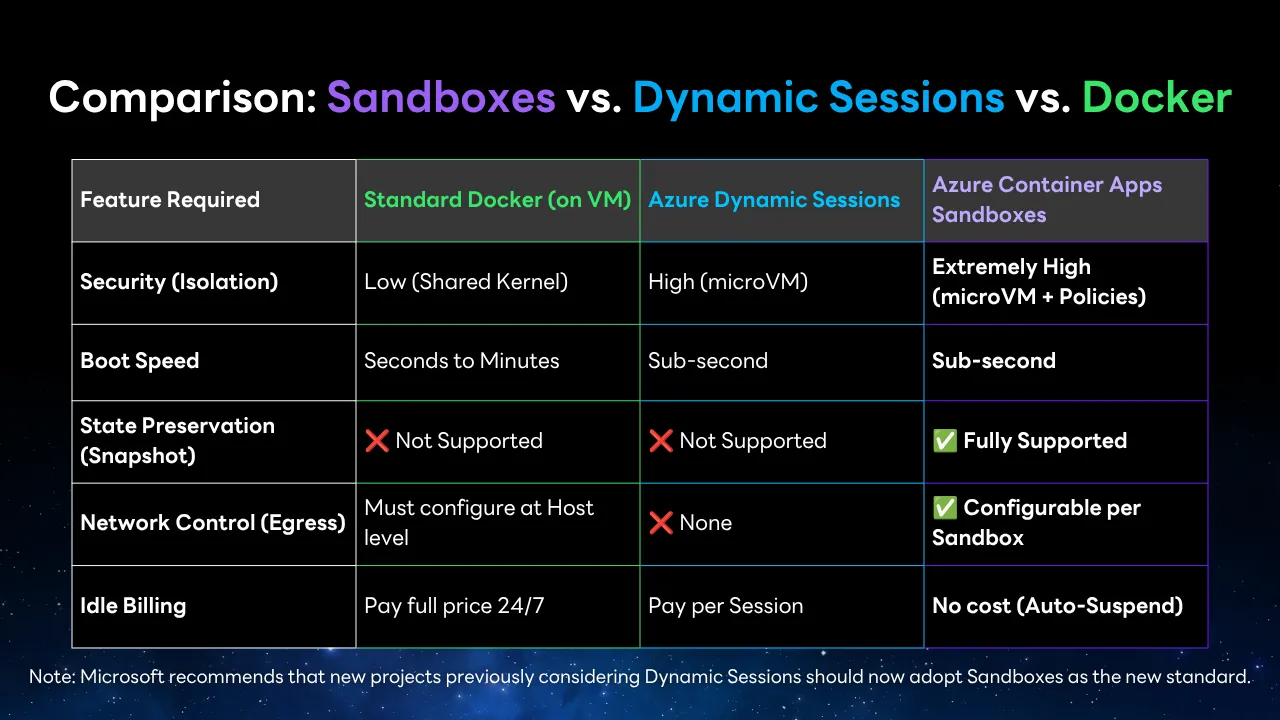
📊 Comparison: Sandboxes vs. Dynamic Sessions vs. Docker
To help you easily decide which tool fits your project:
Feature Required | Standard Docker (on VM) | Azure Dynamic Sessions | Azure Container Apps Sandboxes |
Security (Isolation) | Low (Shared Kernel) | High (microVM) | Extremely High (microVM + Policies) |
Boot Speed | Seconds to Minutes | Sub-second | Sub-second |
State Preservation (Snapshot) | ❌ Not Supported | ❌ Not Supported | ✅ Fully Supported |
Network Control (Egress) | Must configure at Host level | ❌ None | ✅ Configurable per Sandbox |
Idle Billing | Pay full price 24/7 | Pay per Session | No cost (Auto-Suspend) |
(Note: Microsoft recommends that new projects previously considering Dynamic Sessions should now adopt Sandboxes as the new standard.)
⚠️ Best Practices and Pre-Production Warnings
Beware of Snapshot Costs: While the Sandbox itself is free when paused (Idle), if you use the state preservation mode (Memory + Disk Snapshot), that data is stored in Azure Blob Storage, which incurs costs (free only during Preview). Therefore, you should configure the Lifecycle to Auto-Delete upon complete task execution.
Always Use Managed Identities: Do not hardcode API Keys or Passwords into your Images. Use Azure Managed Identities to allow your Sandbox to securely fetch secrets from Key Vault.
Plan Your Resource Tiers Carefully: If you take a Snapshot of a system running in Tier M (2GB RAM), you cannot resume it later in Tier L (4GB RAM). You must plan your Resource Tiers correctly during the creation phase.
🎯 Conclusion
Azure Container Apps Sandboxes is not just a new toy; it's an Enterprise-grade Infrastructure that fills a crucial missing piece in building AI Agents (Agentic Workflows). It gives AI the freedom to execute real actions autonomously while keeping it securely locked in a "cage" that is safe, cost-effective, and blazing fast to spin up or tear down.
If your team is developing Auto-Coders, Data Analysis Agents, or programming grading systems, this is a technology you need to start experimenting with today!
Follow Superdev Academy on all platforms:
🔵 Facebook: Superdev Academy Thailand
🎬 YouTube: Superdev Academy Channel
📸 Instagram: @superdevacademy
🎬 TikTok: @superdevacademy
FAQ: Frequently Asked Questions about This Article
A collection of questions and answers to help you better understand the content of this article.