14/10/2026 10:33am

Is MacBook Neo Good? Review for Programming & UX/UI: Can It Handle Figma?
#MacBook Neo
#รีวิว MacBook Neo
#MacBook เขียนโปรแกรม
#MacBook ทำดีไซน์
#MacBook Neo Figma
#Notebook สาย Tech
Whenever beginners ask our team, "Do I need to buy an expensive Mac to start coding or doing UX/UI design?" our most frequent answer used to be, "Not yet." However, Apple’s release of the MacBook Neo changes the entire conversation. Dropping at the lowest entry-level price point Apple has ever offered, this machine makes entering the ecosystem genuinely affordable.
This brings up a crucial question we want to answer directly: How well can this budget laptop actually handle programming and design workflows?
What Exactly is the MacBook Neo?
To sum it up for tech professionals: The MacBook Neo is an entry-level MacBook positioned just below the Air and Pro lineups. Interestingly, instead of a traditional M-series processor, it runs on the A18 Pro—the exact same chip found in the iPhone 16 Pro.
The most debated specification is its 8GB of RAM. Seeing "8GB" in 2026 makes many developers immediately shake their heads. While it is a valid concern, the reality isn't entirely black and white. macOS handles unified memory much differently than Windows manages RAM, meaning a direct spec-to-spec comparison does not tell the whole story.
Performance Under the Hood: A Mobile Chip in a Laptop Body
Can a mobile-first processor like the A18 Pro compete with dedicated desktop M-series silicon? Thanks to the MacBook Neo’s fanless aluminum chassis, the thermal management is significantly better than any smartphone. With a much larger surface area to dissipate heat, the chip sustains peak performance without suffering from aggressive thermal throttling. In everyday tasks, its single-core processing speed clocks in remarkably close to an M2 chip.
For Developers: How Far Can It Go?
If you are just starting out or primarily focus on front-end web development, the experience is incredibly smooth. Running VS Code, spinning up a local web server, keeping multiple browser tabs open, managing Git, and streaming an online tutorial simultaneously won't cause the machine to stutter. This represents about 90% of what a web development student or junior dev does daily.
The performance ceiling begins to show when you push into heavy backend infrastructure. Running multiple Docker containers concurrently, booting up heavy local Virtual Machines, launching Android Emulators, or opening massive IDEs will push the 8GB ceiling to its limits. It is still possible, but this is the exact threshold where upgrading to a MacBook Air or Pro with more memory becomes necessary.
Simply put: If your goal is to learn coding and take on web development gigs, the Neo offers incredible value. If your goal is heavy microservices or backend system development, pay extra for a higher-tier model.
For Designers: Can It Handle Figma?
For UX/UI designers, the ultimate test comes down to one question: "Does Figma lag?" because that is the application you will be staring at all day long.
Instead of guessing, our team unboxed the MacBook Neo to check out its build quality and handed it over to our resident UX/UI designer to put it through a real-world stress test.
The verdict? For general design work, building UI components, and linking standard prototypes in Figma, the laptop handles it effortlessly. It is not painfully slow or laggy like many feared. However, if you regularly work inside massive enterprise design files containing hundreds of heavy frames, or if you plan to edit video projects on the side, you will want a more robust machine.
Value Comparison: MacBook Neo vs. MacBook Air M2 (Discounted)
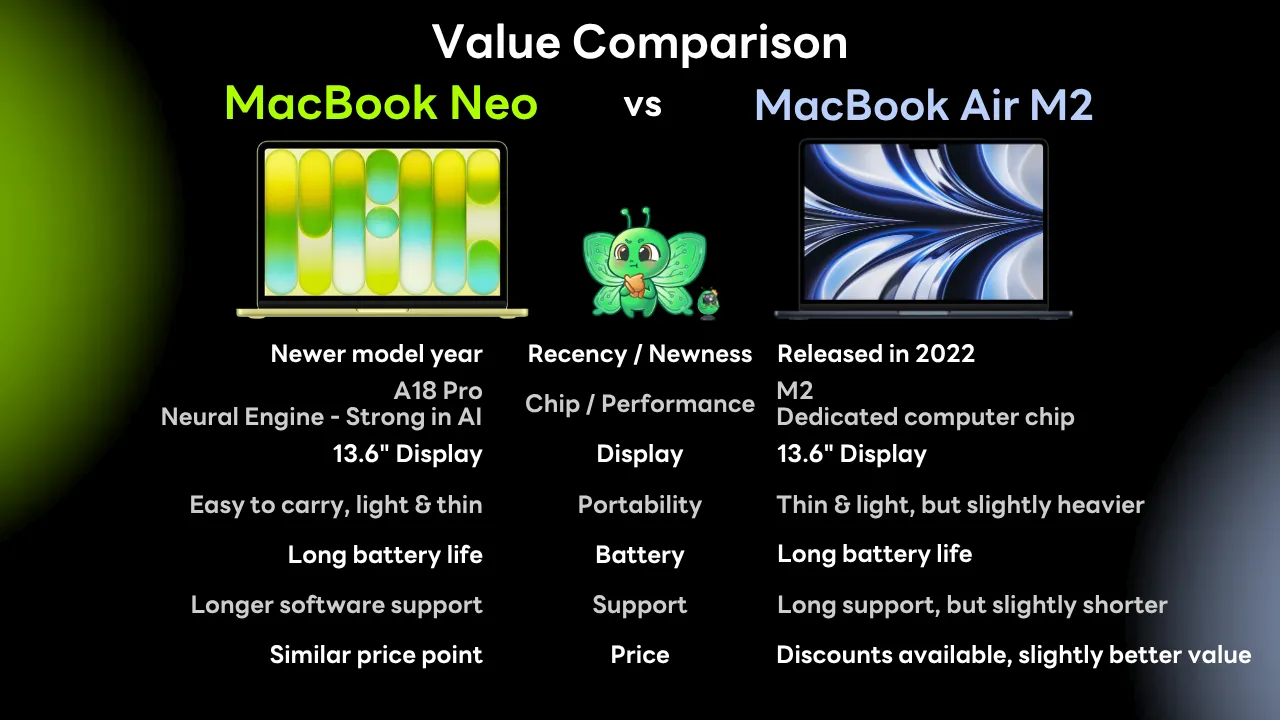
Many buyers debate between a brand-new MacBook Neo and a discounted base-model MacBook Air M2. The benefit of choosing the Neo is that you get a brand-new release cycle with longer software support lifecycles, alongside an A18 Pro chip featuring a highly capable Neural Engine for local AI workflows. On the other hand, the MacBook Air M2 offers a slightly larger display and a dedicated desktop architecture layout. If screen real estate is your primary concern, the Neo might feel tight; but for portability and longevity, the Neo wins out.
Key Limitations to Know Before Buying
Limited Ports: The MacBook Neo features a minimal physical layout, usually offering just 2 Thunderbolt / USB 4 ports. If you rely on external mice, keyboards, and storage simultaneously, a USB-C hub is mandatory.
Single External Display Support: The device natively supports only one external monitor. If you are a developer who loves a triple-screen desk setup (laptop display + two external monitors), this laptop will not support it out of the box.
Zero Upgradability: Like all modern MacBooks, the RAM and storage are soldered directly onto the logic board. What you buy on day one is what you are stuck with for the lifespan of the machine.
The Verdict: Who Should Buy It?
Let’s break it down straight:
Buy the MacBook Neo if: You are learning web development, diving into UX/UI design, focusing heavily on Figma, and want your first affordable entry into the Apple ecosystem. It is an amazing value for money—spend the cash you save on courses, tools, or learning resources.
Skip it and get an Air or Pro if: You already know your daily workload demands heavy multitasking, continuous Docker environments, massive design libraries, or professional video production.
Don't let the excuse of "not having a powerful enough computer" hold you back from starting. Many of the industry's best engineers started on far weaker hardware. The machine is just a tool—your daily consistency and execution are what truly matter.
Follow Superdev Academy on all platforms:
🔵 Facebook: Superdev Academy Thailand
🎬 YouTube: Superdev Academy Channel
📸 Instagram: @superdevacademy
🎬 TikTok: @superdevacademy
FAQ: Frequently Asked Questions about This Article
A collection of questions and answers to help you better understand the content of this article.