18/08/2026 21:15pm

What is Kubernetes? A Complete Beginner's Guide
#Container Orchestration
#DevOps
#Kubernetes
#K8s
#Kubernetes for beginners
#What is Kubernetes
#K8s tutorial
If you have ever heard the word "Kubernetes" and wondered what it actually is, why it is so popular, and when you should use it, this article is for you. We will break down everything from the ground up no prior DevOps experience required!
What is Kubernetes?
Kubernetes (pronounced "koo-ber-net-ees"), commonly abbreviated as K8s (since there are 8 letters between 'K' and 's'), is an open-source platform designed to automate containerized application deployment, scaling, and management. Originally developed by Google, it is now maintained by the Cloud Native Computing Foundation (CNCF).
In simple terms: Kubernetes helps you deploy and manage hundreds or thousands of containers efficiently without having to do everything manually.
💡 Analogy: Think of a massive shipping port. A Container is like a standard shipping crate. Kubernetes is the port management system—it decides where each crate goes, scales them up or down when needed, and replaces them if they get damaged. |
Before Kubernetes: Understanding Containers
A Container is a lightweight package that bundles your application along with all its required libraries and dependencies. This ensures that the app runs exactly the same on any environment, whether it is on a developer's laptop or a production server.
While Docker is the most popular tool used to create containers, managing them becomes a nightmare when your app grows and you need to run hundreds of them simultaneously. That is precisely where Kubernetes comes in to orchestrate the chaos.
Problems That Kubernetes Solves
Imagine you have a web application running 50 containers. How would you handle these real-world scenarios manually?
A server crashes at midnight, destroying half of your containers.
Traffic suddenly spikes to 100,000 concurrent users, requiring immediate scaling.
You need to roll out a new feature without causing any downtime for users.
You need to distribute containers across multiple servers to prevent overloading.
Kubernetes handles all of these challenges automatically saving you from those 3 AM emergency calls.
Kubernetes Architecture
Kubernetes operates as a Cluster, which is a group of machines (Nodes) working together. The architecture is split into two main components:
1. Control Plane
The brain of the cluster that makes global decisions. It includes:
API Server: The main gateway that intercepts all commands (e.g., from
kubectl).etcd: A reliable key-value store that holds the entire state of the cluster.
Scheduler: Decides which Worker Node a newly created container should live on.
Controller Manager: Continuously monitors the cluster to ensure the current state matches the desired state.
2. Worker Nodes
The actual machines that run your applications. Each node contains:
Kubelet: An agent that receives instructions from the Control Plane and ensures containers are running smoothly.
Container Runtime: The software responsible for running containers (e.g., containerd).
kube-proxy: Manages network connectivity and routing for your containers.
Core Concepts You Need to Know
Concept | Definition | Analogy |
Pod | The smallest deployable unit in K8s, containing one or more containers. | A single apartment unit |
Deployment | Defines the desired state (how many Pods you want) and handles updates. | A lease agreement specifying the number of rooms |
Service | Provides a permanent IP address to access a group of Pods. | The building's front reception desk |
Namespace | Divides a single cluster into multiple virtual environments. | Different floors of the building |
ConfigMap | Stores non-confidential configuration data. | The building's public bulletin board |
Secret | Safely stores sensitive data like passwords and API keys. | A secure safe inside the building |
Ingress | Manages external access to the services within the cluster. | The main entrance gate of the building |
How Kubernetes Works in Real Life
Here is a quick look at what happens behind the scenes when you deploy an app:
Deploy Command: You write a YAML file stating you want 3 replicas of your application and apply it to the cluster.
Scheduler at Work: The Scheduler finds nodes with enough available resources and assigns the Pods.
Kubelet Takes Over: The Kubelet on each assigned node pulls the container image and spins it up.
Continuous Monitoring: K8s constantly checks the health of your Pods. If one crashes, it automatically recreates a new one.
Auto-Scaling: If CPU usage spikes beyond a set threshold, the Horizontal Pod Autoscaler automatically spins up more Pods to handle the load.
Who is Kubernetes For?
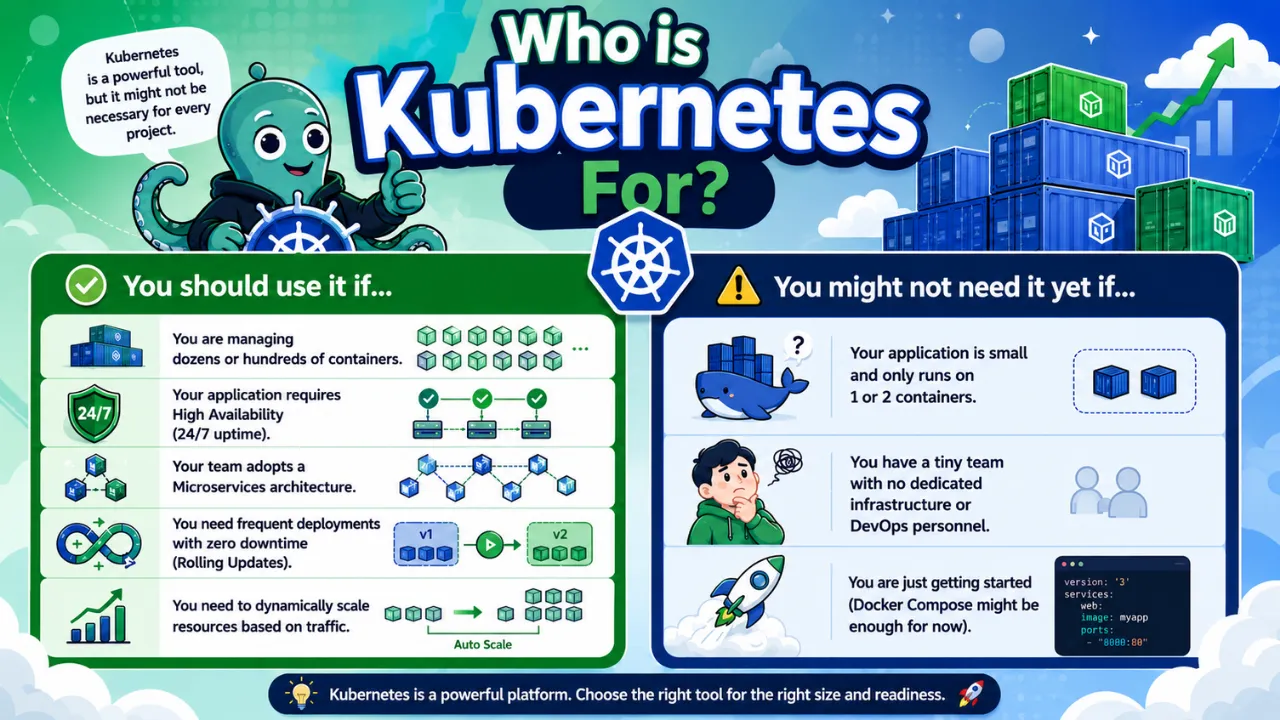
Kubernetes is a powerful tool, but it might not be necessary for every project.
✅ You should use it if...
You are managing dozens or hundreds of containers.
Your application requires High Availability (24/7 uptime).
Your team adopts a Microservices architecture.
You need frequent deployments with zero downtime (Rolling Updates).
You need to dynamically scale resources based on traffic.
⚠️ You might not need it yet if...
Your application is small and only runs on 1 or 2 containers.
You have a tiny team with no dedicated infrastructure or DevOps personnel.
You are just getting started (Docker Compose might be enough for now).
Managed Kubernetes on the Cloud
Setting up Kubernetes from scratch can be challenging. Fortunately, major cloud providers offer Managed Kubernetes services where they manage the Control Plane for you:
EKS (Amazon Web Services)
GKE (Google Cloud Platform)
AKS (Microsoft Azure)
DOKS (DigitalOcean)
For beginners looking to practice locally on their own machines, tools like Minikube or Kind (Kubernetes in Docker) are highly recommended.
Essential kubectl Commands
kubectl is the command-line interface used to interact with your Kubernetes cluster. Here are some of the most common commands:
kubectl get pods: Lists all Pods in the current namespace.kubectl apply -f app.yaml: Deploys or updates resources defined in a YAML file.kubectl describe pod <name>: Shows detailed information and events of a specific Pod.kubectl logs <pod-name>: Fetches the logs of a container inside a Pod.kubectl delete pod <name>: Deletes a Pod (K8s will automatically recreate it if managed by a Deployment).kubectl scale deployment <name> --replicas=5: Instantly scales the number of replicas to 5.
Recommended Learning Path
If you want to master Kubernetes, we suggest following these steps:
Step 1: Master Docker First: Understanding containers is a strict prerequisite before moving to orchestration.
Step 2: Practice with Minikube: Spin up a local cluster on your machine and practice deploying basic apps.
Step 3: Write YAML Files: Get comfortable writing configurations for Deployments, Services, and ConfigMaps.
Step 4: Learn Helm Charts: Explore Helm, the package manager for Kubernetes, to manage complex applications.
Step 5: Go to the Cloud: Try deploying workloads on GKE or EKS to gain production-like experience.
Summary: Kubernetes in 5 Sentences
Kubernetes is an open-source platform that automates container management, allowing applications to scale effortlessly and stay highly resilient. By automatically handling scaling, self-healing, load balancing, and zero-downtime updates, K8s eliminates heavy infrastructure management. This allows development teams to focus entirely on writing code rather than worrying about server stability. Today, Kubernetes has officially become the industry standard for cloud-native application deployment worldwide.
Follow Superdev Academy on all platforms:
🔵 Facebook: Superdev Academy Thailand
🎬 YouTube: Superdev Academy Channel
📸 Instagram: @superdevacademy
🎬 TikTok: @superdevacademy
🌐 Website: superdevacademy.com