07/06/2026 06:45am
Why is the Keyboard Layout QWERTY?
#Superdev Academy
#QWERTY keyboard history
#why is keyboard QWERTY
#alternative keyboard layouts
#Dvorak layout for developers
#Colemak layout
#ergonomic keyboard
#programmer keyboard setup
Have you ever experienced this? You’re in the middle of a smooth coding session, and as you glance down at your fingers furiously hammering away at the keyboard, a question pops into your head Why on earth are the keys arranged as Q-W-E-R-T-Y? Why didn't they just arrange them from A-B-C-D and call it a day? On top of that, a developer's ultimate companions like the semicolon (;) or curly braces ({ }) are somehow tucked away in the most awkward, hard to reach corners.
But believe it or not, this is no coincidence. Historically speaking, the keyboard you are using right now was designed over a century ago. Its primary purpose was actually to solve mechanical jamming issues, inadvertently turning into a system that forces our fingers to move in less efficient ways without us even realizing it.
Today Superdev will take you back in time to trace the quirky history of the QWERTY layout. We will also dive deep into the Battle of Alternative Layouts that developers around the world are secretly switching to. These layouts help double typing speeds while effectively saving wrists from the clutches of Repetitive Strain Injury (RSI) and office syndrome.
If you are currently suffering from shoulder pain, finger fatigue, or just feeling frustrated with your current keyboard... get ready to face the hard truths of IT history together!
🧩 The Origin of QWERTY
If we travel back in time to the 1870s an era long before computers existed the ultimate weapon of choice for typists back then was the Typewriter, which operated on a 100% mechanical system.

An American inventor named Christopher Latham Sholes designed one of the earliest models of the typewriter. Initially, he arranged the keys in the standard alphabetical order from A-B-C-D. But here lay the problem...
As people practiced and began typing faster, the mechanical metal typebars of letters that were frequently typed sequentially (such as 'T' and 'H', or 'S' and 'T') would fly up to strike the paper at the exact same time. This caused the metal arms to collide and jam against each other, making it impossible to continue typing and frequently causing the machine to break down.
[Typing Too Fast] ──> [Typebars Collide] ──> [Mechanical Jam]
To solve this issue, Sholes came up with a brilliant idea: Why not take the pairs of letters that are most frequently typed together and separate them, placing them as far apart from each other as possible?
That is the real reason why the letters on your keyboard are scattered into the QWERTY layout we see today. It was created purely to manage the physical rhythm of typewriter mechanics so the machine could function without jamming not because it was the fastest or most efficient layout for human fingers.
💻 The World Moved to Computers... So Why Are We Still Using QWERTY?
The classic question that follows is: since we now use electronic keyboards or type on smartphone screens with no mechanical typebars to ever jam again, why does humanity stubbornly stick to QWERTY?
In the fields of economics and technology, there is a perfect term that explains this phenomenon Path Dependence.
Imagine this: over a century ago, typing schools worldwide had already built their curricula around QWERTY. Every company had purchased QWERTY typewriters. Millions of people globally had trained their fingers and developed muscle memory exclusively for the QWERTY layout. Therefore, when the world transitioned into the computer age, telling everyone to "forget everything you’ve ever learned and let's practice an entirely new layout" became practically impossible. The cost of changing human behavior on such a massive scale was simply too high.
⌨️ QWERTY vs. Alternative Keyboards
While everyday users might not think twice about it, for Developers or Designers whose fingers are glued to a keyboard for 8 to 12 hours a day, the QWERTY layout is a long-term nightmare. It forces our fingers to stretch and move around highly inefficiently, making it a leading cause of RSI (Repetitive Strain Injury) and wrist fatigue.
Because of this, a subculture of developers in the tech community has chosen to wave goodbye to QWERTY. Instead, they turn to alternative layouts to reclaim their finger health. Here are the two biggest and most popular rival camps:
1. Dvorak Layout (The King of Comfort)
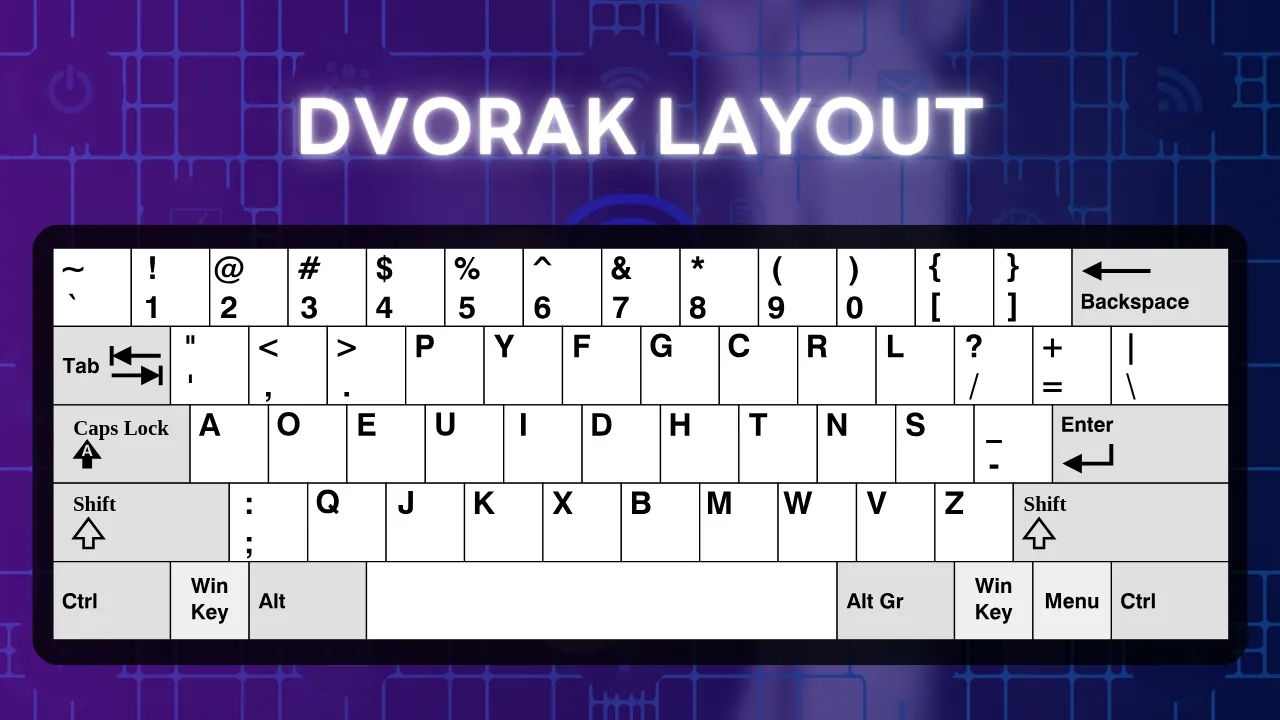
Invented by August Dvorak in 1936, this layout goes all in on Ergonomics. It takes the most frequently used letters in the English language (A, O, E, U, I, D, H, T, N, S) and places them all directly on the Home Row (the middle row).
The Result: Your fingers barely have to reach up or down. Research shows that the Dvorak keyboard reduces finger travel distance by 60–70% compared to QWERTY. This makes coding an absolute breeze and drastically cuts down on typing fatigue.
2. Colemak Layout (The Middle Ground for Copy-Pasters)
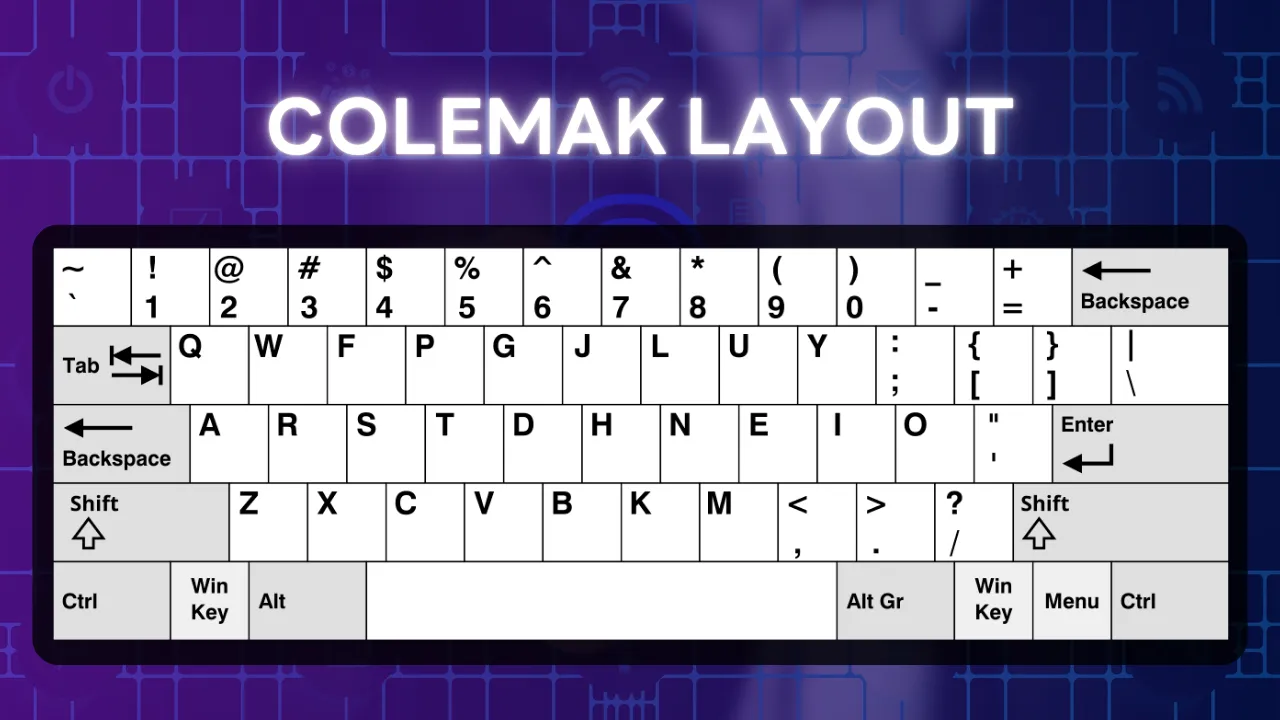
Released by Shai Coleman in 2006, this layout was created because Dvorak shifted too many keys around, making the learning curve too steep for most people. Colemak takes a smarter approach by changing only 17 key positions from QWERTY, moving only the most frequently used keys to the Home Row.
The Killer Feature Devs Love: Colemak deliberately keeps the positions of essential shortcut keys like
Ctrl+Z,Ctrl+X,Ctrl+C, andCtrl+Vexactly where they were on QWERTY! This means you can still copy and paste code or design specs seamlessly without having to re-learn your favorite hotkeys.
❓ Frequently Asked Questions (FAQ)
Q1: Is it true that the QWERTY keyboard was designed to make people type slower?
A: Not entirely true. This is a common historical misconception. The true intention of Christopher Sholes was to separate letters that are frequently typed sequentially to prevent the mechanical metal typebars from colliding and jamming. He never intended to intentionally frustrate users or make them slower. Instead, it was simply about managing the physical rhythm of the technology available at the time to make the machine operate as smoothly as possible.
Q2: Does the Dvorak layout actually make you type faster than QWERTY?
A: In theory it makes typing much more comfortable, but it might not drastically increase speed for everyone. Studies have shown that Dvorak significantly reduces finger movement by 60–70%, which is fantastic for ergonomics and reducing cumulative fatigue. However, when it comes to raw typing speed, it ultimately comes down to an individual's practice and muscle memory.
Q3: Why do programmer keyboards (Custom Keyboards) often cut out the number pad (Numpad) on the right?
A: These keyboards are known as TKL (Tenkeyless) or smaller form factors like 75% / 65% layouts. The primary reason is shoulder and wrist health. Removing the numpad shortens the physical length of the keyboard, narrowing the gap between your keyboard and your mouse. During use, this keeps your arms and shoulders in a natural position parallel to your body, eliminating the need to flare your arm outward to reach the mouse. It does wonders for reducing shoulder and neck pain.
Q4: How do I fix the annoying language-switch issue where I end up typing the wrong code symbols (e.g., intending to type ~ or ; but getting Thai characters instead)?
A: Thai programmers generally tackle this problem using three main methods:
Change the language switch hotkey from the Grave Accent (
~) to theCaps LockorCtrl+Shiftkeys instead, freeing up the~key so it can be typed normally in your code.Configure your operating system's settings to use English as the system's Default Language.
Use a Custom Keyboard that supports Layer Programming (via software like VIA or QMK). This allows you to map frequently used symbols like
;,{, and}onto a dedicated layer, making them easy to press regardless of which language your OS is currently set to.
Q5: What type of keyboard is best for reducing finger stiffness or office syndrome for people who type all day long?
A: An Ergonomic Keyboard or a Split Keyboard (a keyboard split physically into two separate halves) is the ultimate answer. The split design or tented angles allow your wrists and forearms to rest at a completely natural angle much like how your arms naturally rest when relaxed. This prevents you from having to twist your wrists completely flat to match a traditional straight keyboard, providing the best protection against Carpal Tunnel Syndrome (compressed nerves in the wrist).
💬 Conclusion
At the end of the day, the QWERTY keyboard might not be the absolute best layout in terms of ergonomics or maximum speed, but it remains the global standard that everyone accepts simply due to sheer habit and familiarity.
For developers and designers, switching to an alternative layout like Dvorak or Colemak definitely requires some patience as you retrain your brain over the first 1 to 2 months (and yes, typing painfully slow at first can be incredibly frustrating!). However, the long-term payoff for your wrist health and overall typing comfort is massively worth it for anyone who plans to spend the next several decades living their life at a keyboard.
What about you guys? Are you still riding with Team QWERTY, or have you already jumped ship to Team Dvorak or Colemak? Also, has anyone fully customized their keyboard just to make typing
;or{ }easier?
Follow Superdev Academy on all platforms:
🔵 Facebook: Superdev Academy Thailand
🎬 YouTube: Superdev Academy Channel
📸 Instagram: @superdevacademy
🎬 TikTok: @superdevacademy
🌐 Website: superdevacademy.com